Condensing Twenty Years of Wisdom in One Markdown

I Have, Once Again, Become a Manager, and I Kinda Love It.
I’ve been building at a genuinely unreasonable pace lately. Open source on one monitor, private commercial work on another, and somewhere in the middle of that a startup I am trying to bootstrap into existence before my savings account files a formal complaint.
And here’s the thing nobody warned me about: at this point I feel very much like the manager of a ten-to-twenty person elite engineering team. Not metaphorically. Structurally. The team never sleeps, never argues about tabs, never takes a sabbatical to “find itself” in Lisbon, and never once asks me whether we’re doing OKRs this quarter. It just sits there, idling at full capacity, waiting.
Waiting for me.
I am the bottleneck. Me. The specifications are the bottleneck. The acceptance criteria are the bottleneck. “Did you actually click the button and see if the thing does the thing” is the bottleneck. I have become the single-threaded process in an otherwise embarrassingly parallel system, which, if you have ever profiled anything in your life, is exactly the outcome you spend your entire career trying to avoid.
So I am on a mission to automate myself out of that position as aggressively as possible. Along the way a few things fell out of the process that I think are genuinely useful to other people, so here they are.
The Great Skills Gold Rush of 2026
Meanwhile, in the broader ecosystem: every other week somebody publishes a repo of “Andrej Karpathy’s skills” - they are not, in fact, his - and collects twenty thousand GitHub stars before lunch.
And we are all encouraged, loudly and continuously, to curl | bash a pile of instruction files from a stranger’s repository into the context of an agent that has read access to our entire filesystem and write access to our entire codebase. Why? Because it has a lot of stars. That’s the whole security model. Stars.
We spent fifteen years building supply-chain scanning, SBOMs, dependency pinning, Dependabot, provenance attestation, and reproducible builds, and then collectively decided that a markdown file which literally reprograms the thing writing our code deserves less scrutiny than a transitive npm dependency. Bold. Genuinely bold.
I am not going to install your skills. I am going to write my own, because I actually know things, and because the only person whose taste I have to trust in this arrangement is somebody I have been arguing with for twenty years: me.
The Inspiration: Kun Chen, and Doing It the Old Way
My latest round of workflow surgery was directly inspired by Kun Chen’s video, “L8 Principal Building a Full Stack App with Agentic Engineering”. I cannot overstate how worth watching this is. Go watch it. I’ll wait. The post is long, you’ll need the stamina.
This guy is young, and yet he attacks problems the old-school way: you don’t like how something works? Write your own. And write he did. lavish-axi alone is priceless - a local-first editor for the HTML artifacts your agent produces, so that the review loop stops being “take a screenshot, paste it, write four paragraphs describing what’s wrong with the padding” and starts being “click on the broken thing and tell it.” HTML is the new markdown, annotations are the new code review, and somebody just went and built it instead of tweeting about how somebody should build it.
That is the correct instinct, and it is in desperately short supply right now.
About That 500x
Let me put a number on the pace, and then let me immediately qualify it into the ground.
In terms of pure lines of code produced - code that works, that follows the best practices I set, that I did not trust and therefore manually tested to death on top of the 96% coverage the test suite already gave me - I am currently something like 500x more productive than during some of the most productive stretches of my career, including pairing with the founding engineering team at Wanelo.
Five hundred. Times.
Now sit with the second-order consequence for a second, because it is not a victory lap: nobody has time to review this much code. Not me. Not you. Not the very good engineer you’re about to hire. The review bandwidth of a human being did not go up 500x. It went up approximately 0x, and arguably down, because now the diffs are enormous and uniformly plausible-looking, which is the single worst property a diff can have.
Which brings me to the actual point of this post.
The Only Leverage That Scales Is Taste, Written Down
If you cannot review the output, you have to constrain the input. That’s it. That’s the whole trick. You move your judgment upstream, out of code review and into the context the agent reads before it writes a single line.
So I have been slowly dumping my knowledge into skills and context files for the agents to load. And I must say it is highly satisfying when they get things right - when an agent reaches for algorithm: :concurrently, sets a lock_timeout, and names the column amount_cents without being asked. There’s a lovely little dopamine hit, followed about four seconds later by: oh, right. I wrote that goddamn instruction set. I am being complimented by my own reflection.
Still counts. I’ll take it.
So here is one of them, in full. This is my local ~/.agents/context/postgresql.md, which is loaded by ~/AGENTS.md only on demand - when an agent is about to generate a migration, design a schema, or propose a sub-schema for an existing application. The rest of the time it stays out of the context window, where it belongs.
The file is big. It eats a lot of tokens. It should probably be split into four or five smaller files that load even more selectively, and one day it will be.
But for a blog post? Nah. Fuck it. Here it is in its full glory.
And do read past the finish line: after the horizontal rule there’s a note on transaction ID wraparound, a topic that essentially nobody outside the PostgreSQL core team and your friendly neighborhood LLM genuinely understands. It’s not in the skills file, because the agents already know it most of the time. You need to know it. That asymmetry should worry you slightly.
With that, godspeed.
My “PostgreSQL Best Practices - For the AI Agents”
NOTE
What follows is the file itself, verbatim, warts and all. I have not tidied it up for publication, because the tidy version is a lie about how these things actually get written. They accumulate. They contain a stray empty heading from some 2am refactor. That is the job.
This document below is meant to be placed in a subdirectory of ~/.agents and be mentioned in your ~/AGENTS.md file, as a reference to load anytime my AI agents need to do something PostgreSQL related — design PostgreSQL schema, optimize queries, or propose a sub-schema to an existing application, you name it.
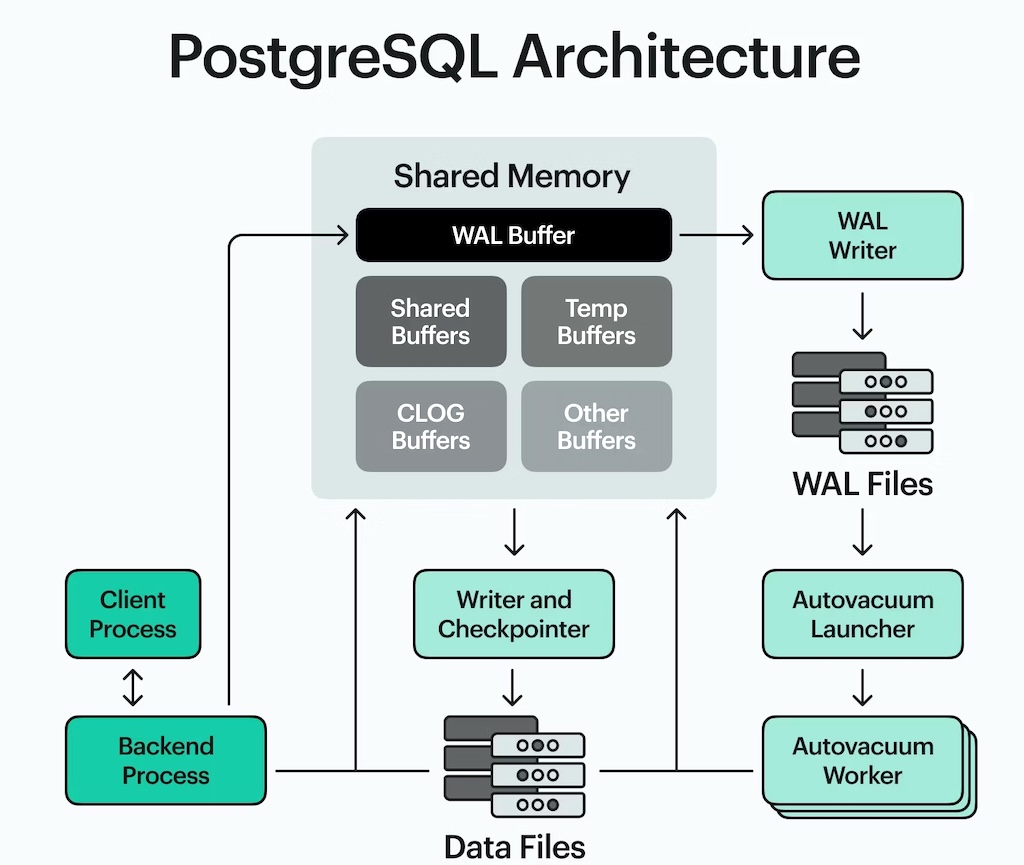
PostgreSQL’s internal architecture. Every single one of the rules below is downstream of some box on this diagram doing exactly what it says it does, at the least convenient possible moment. (Source: “What is PostgreSQL?”, by Alex Mika, reviewed by Juri Vasylenko)

Best Practices for AI Agents that Build Software that Use PostgreSQL (v18)
Instructions for AI agent working on codebases with PostgreSQL component.
While PostgreSQL is moving exceptionally fast, and new features or new behavior may override the old, you are going to adhere to these rules judiciously, and only when you find a new feature contradicting something here or a specific use case you will stop and have a conversation with your human co-author.
Application Classifications
Before we dive into the practices, it helps to define what kind of application we are building because the rules change based on the type of application sometimes. Getting this wrong is the difference between a schema and a liability, and nobody has ever discovered they were building PG-strict at a convenient moment.
For the purposes of this skill, we’ll define the following classes of applications:
- PG-lax
- Type: OLTP. Many small transactions from a potentially large number of concurrent users. Generally, non-critical applications, games, social apps, with an unknown (but likely small) number of users (which can grow), where the cost of invalid data reference or a missed insert is relatively low. These types of applications can be configured to perform delayed commits, and even be eventually consistent. Often in these cases it's more important that the development moves fast, and the database is not in the way. Physical deletes are a norm, logical deletes are not. Foreign key delete behavior is often
ON DELETE CASCADE. - PG-traditional
- Type: OLTP. Many small transactions from a potentially large number of concurrent users. Otherwise, its design is tighter than that of PG-lax. Perhaps this database may contain PII on a large number of users, or be a backend for an e-commerce store, where referential integrity saves time and effort on tracking down problems and customer complaints. However, it may not need many encrypted fields or SSL-only connections, it may be directly accessible by the operations staff via a VPN, and whether to apply physical deletes or logical to key tables is a production decision.
- PG-strict
- Type: OLTP. Many small transactions from a potentially large number of concurrent users. The opposite of PG-lax: these applications often manage money, transactions, taxes, a significant amount of PII or health records, and a mistake, leak, or a data corruption in such an application, as well as any extended downtime, will cost a significant amount of money. In addition, it can be legally bound to perform security audits, penetration testing and so on. These types of applications often prefer immutability (eg. on the transactions table) with a later transaction inserted to amend the previous one, instead of updating it directly in place. Many tables maintain audit trails (via the triggers), and tight security, encryption at rest, encryption of columns in real-time, and SSL-only access often using public/private key. These databases almost never allow physical deletes, and perform logical delete only by having each table carry the
deleted_atnullable column, the null value of which is usually part of some unique index.ON DELETEbehaviour is typically custom, and deletions often propagate by settingdeleted_aton the dependent rows, but almost never physically delete anything. - PG-analytics
- Type: Data Warehouse. These PG instances are meant for analytics, data warehousing, and often contain a large number of materialized views, ingest data from multiple sources, and have a small number of concurrent users performing large and long-running queries. These applications rarely perform physical deletes, are optimized for ingestion of data and fast batch imports.
IMPORTANT
It is critically important to understand what type of application we are dealing with before applying the rules. If the agent is engaged in designing the schema, it must first ask the user (or read in the spec) and infer the type of application this is, and record it in its AGENTS.md file or CLAUDE.md file. This decision will guide many of the conventions and default behaviors.
NOTE
Note that the following advice is presented in no particular order, but it is slightly biased towards the PG-strict type applications, hence the ordering may be suited best for such apps.
Schema, Table & Column Naming
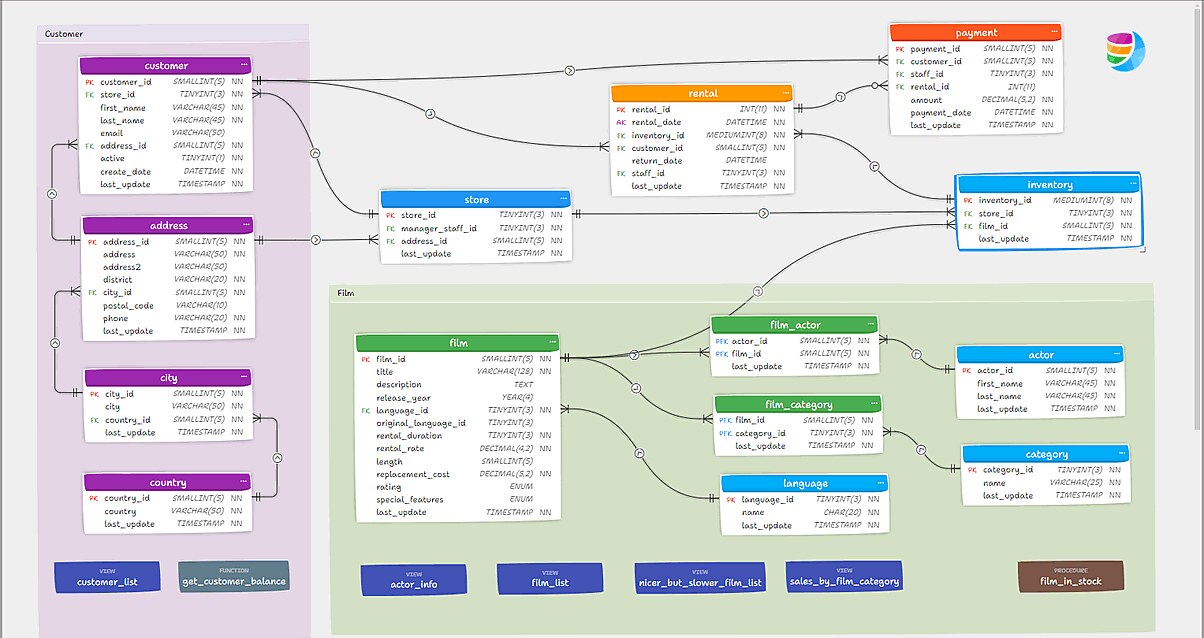
A perfectly nice ER diagram which, I would like everyone to notice, uses singular table names and business-prefixed primary keys throughout. customer.customer_id. We are about to have words about that. (Vasek Frolik, CC BY 4.0, via Wikimedia Commons)
Regardless of what application we are building and in what language, we are generally going to lean on Rails conventions for database and table naming:
- Table names are plural, lower cased, underscored
- Column names are singular (unless it’s an array), also lower case, underscored and are constructed using proper English words, almost never abbreviations unless it’s something extraordinarily well known, such as
llmori18n. - Foreign keys are also singular, eg
userstable, may be referenced byprofileswith a singular columnprofiles.user_id. - Each foreign key MUST state its
ON DELETEbehaviour explicitly -CASCADE,RESTRICT,SET NULLorNO ACTION. The right answer depends on the application class (see above). Leaving it unstated meansNO ACTION, which is a decision nobody made.
PolyMorphic Tables & STI (Single Table Inheritance) Table
If you are dealing with Rails, Django, or similar frameworks, you have very likely come across both polymorphic tables (for instance - edibles with edible_id and edible_type mapping to a class in your language such as strawberries and bananas), where each class may use only a fraction of the columns of the entire table.
STI is another way to have many classes map to a single table, this time using class inheritance, implemented in the database as a type column which typically by default carries the class name that needs to be instantiated upon read.
As a complementary approach to STI, Rails recently introduced so-called “Delegated Types”, which are kind of like STI, but where the mapping between classes and the tables is actually 1-1, and there is a polymorphic table in the middle joining them all into one happy family. So it’s more like a polymorphic table, honestly, than it is an STI table. For a reference please see this blog post by Vincent, an Iterative Thinker.
There are a couple of important points you should know about these mappings between classes and database tables.
- The polymorphic column pair can never be a real foreign key. A FK constraint targets exactly one table, and
edibles.edible_idtargets whichever tableedible_typehappens to name on that particular row. There is no SQL for that. This is the actual limitation, and it is precisely why Delegated Types are attractive: each concrete type gets its own table, and the join row carries a genuine, enforced FK to it. - STI is the opposite problem, and it is subtler. An STI table is one real table with one real primary key, so other tables can absolutely declare a foreign key onto it - the database will accept
carts.idas a target all day long. What the FK cannot do is constrain which subclass you pointed at. Postgres will cheerfully letsmoothies.banana_idreference a row whosetypeisstrawberry, and it is right to, because as far as it is concerned you asked for a row and you got one. If that distinction matters, you need aCHECKconstraint, a partial unique index, or a different design - not a foreign key. - With STI you have a single column - typically
type, that differentiates the classes, and contains the fully qualified actual classname. And that is the problem. Imagine you decided to refactor your codebase, andShloopify::Checkout::CartbecameAmazonBoughtUs::Checkout::Cart, and thecartsare stored in the STI table because why not, there are many kinds of shopping carts, some roll, some you have to carry, some charge you before you give them your credit card. Jokes aside, this is a gnarly data migration. So the advice is simple: use a single word in lower case designated to each class to tell which class this row belongs to. And in Rails the magical method that helps you resolve all that is calledfind_sti_class. If instead of the first classname we simply storedshloop, we could change the codebase to now resolveshloopto the second class, bypassing the need for a giant multi-day data migration. - Do index the
typecolumn. By itself, and in a composite index withid, type→ this will be used for joins. - With polymorphic tables, the same exact concept applies to polymorphic tables: you do not want the fully qualified classname to be in the
edible_type, you want it to containbananaandstrawberry. The trick in this case is much simpler, you merely need to define a class methodpolymorphic_nameon each class you don’t want to participate in the polymorphic table using its fully qualified classname. - And for the love of god, please create the index on ID first and sort the type so that in the index similar objects are next to each other:
create index on edibles (edible_id, edible_type desc);
Third Party Schemas
Whenever there is a benefit of copying third party tables into our own database due to the active integration, webhooks being received for various events, and so on (examples of which include Stripe, Plaid, and many others) sometimes it’s very beneficial to store the third party’s data in the tables they might publicize and even encourage us to use.
This can be very useful and can provide a good additional source of information about what’s going on in the application, useful in audits, debugging, troubleshooting, and so on, especially if the application is receiving a lot of webhooks from the third party, each of a different schema mapped to a potential table.
In those cases, the following rules apply:
-
Store third party tables always in their dedicated schema named after the third party, eg
stripe.*orplaid.*and so on. -
Our own code, typically, will default to the
publicschema, which is the default schema in PostgreSQL. -
The default schema search path is often set to
"$user", public(you can find that out withSHOW SEARCH_PATH;) -
If you use
psqlyou can list the schema with\dncommand. -
Whenever a new schema is added to the mix, it is imperative that the search path is updated either for the user:
ALTER USER <USERNAME> SET SEARCH_PATH TO $user, public, stripe, plaid;NOTE: this statement would require the user to logout and log back in, and the search path will be updated and persisted.Search Path can also be set or reset temporarily, per current session, and so on. Decide the most appropriate method but beware that if there are name collisions between the vendors, the first schema’s object wins. You will learn this on the day Stripe and Plaid both decide that
eventsis a great name for a table, and your reconciliation job starts confidently reconciling the wrong universe. -
It’s very easy to do cross-schema joins in PostgreSQL, just don’t forget to add the schema prefix before the dot for any schema not in the search path. For this reason you may choose to NOT modify your search path, because that will require you to reference any Stripe or Plaid table with the
stripe.transactionsprefix.
.
Logical vs Physical Deletes
If your application type warrants logical, and not physical deletes, there are some advantages to that. First of all, you never lose any data, so you can always restore someone’s account, or provide forensic assistance to law enforcement.
Secondly, any row that’s physically deleted in PostgreSQL needs to be vacuumed at some point. Vacuuming is an IO-heavy process that, despite all the advancements in parallel vacuuming, may be adding to your database load considerably.
CAUTION
A logical delete does not avoid that cost, and it is worth being precise about why. Under MVCC, an UPDATE writes a new row version and marks the old one dead - exactly the dead tuple a DELETE would have produced. Setting deleted_at on a million rows creates a million dead tuples. What you actually buy with a logical delete is the data, the audit trail, and the ability to undo. You do not buy your way out of vacuum. “It’s not a bug, it’s MVCC” is technically an explanation and emotionally a shrug.
What genuinely reduces the cost is a HOT update (Heap-Only Tuple): when an UPDATE to a row (especially one with a large number of columns) changes only the columns that are not indexed. This allows the previous physical row version and the new version to fit on the same disk page. In this case PostgreSQL skips the index write entirely and the dead tuple can be reclaimed by opportunistic page pruning rather than waiting for a vacuum cycle.
If Your Backend is Ruby on Rails
You have a choice of two battle-tested gems to implement your logical deletes:
Indexes

A B-tree. Note the leftmost-prefix ordering on the drawer labels - BAY-BEE, BEF-BERF, BERG-BERLIN - and note that nobody built a second cabinet sorted by the third letter, because the librarians had finite oak and infinite sense. (Dr. Marcus Gossler, CC BY-SA 3.0, via Wikimedia Commons)
Fewer, wider, deliberate.
Every index is a write tax, a bloat source, and a HOT-update killer - updating an indexed column forces a new index tuple even when nothing else changed. So index from actual query plans, not from a feeling that a column “seems searchable.” Then audit: pg_stat_user_indexes with idx_scan = 0 over a meaningful window is your kill list. On composite column ordering, the rule that actually matters is equality columns first, then range/inequality, then sort columns - an index on (account_id, created_at) serves WHERE account_id = ? ORDER BY created_at DESC LIMIT 20 beautifully, while (created_at, account_id) serves it not at all. Selectivity is a tiebreaker, not the primary criterion; access-pattern shape wins.
The shared-leading-column question is where most Rails apps get fat.
If you have (account_id) and (account_id, created_at), the first is redundant - B-tree leftmost-prefix means the composite answers everything the single-column index answers, so drop it unless you need it for a unique constraint or the size difference genuinely matters for an index-only scan on a huge table. This happens constantly because add_reference/belongs_to auto-creates the single-column index and then you add the composite three sprints later and never look back. But (account_id, created_at) and (account_id, status) are not redundant with each other - neither is a prefix of the other, and PG can bitmap-AND them if it wants. Before adding the second one, though, ask whether a partial index (WHERE status = 'pending') is smaller and better, because it usually is. Partial indexes are the single most underused feature in Postgres: soft-delete apps should have WHERE deleted_at IS NULL on nearly everything.
Index Types, Briefly
- B-tree for basically everything ordered and comparable.
- GIN for
jsonbcontainment, arrays, andtsvectorfull-text. Usejsonb_path_opsif you only ever use@>- it is meaningfully smaller and faster. - GiST for ranges, geometry, and exclusion constraints (
tstzrange+EXCLUDEis how you prevent double-booking correctly, rather than with an application-level race condition you’ll discover in production). - BRIN for append-only, naturally-ordered giants - an events table with a monotonic
created_atgets a usable index at roughly 1/1000th the size. - Expression indexes for
lower(email), thoughcitextis cleaner. pg_trgmfor fuzzy matching andLIKE '%foo%', which no B-tree will ever serve.- Hash indexes: still almost never the answer. They have been almost never the answer for so long that it has become their entire personality.
And here is the trap, because it is exactly backwards from what intuition suggests: a partial index WHERE deleted_at IS NULL disqualifies the update from HOT. HOT eligibility considers every column any index references, and that includes a partial index’s predicate. Setting deleted_at from NULL to a timestamp changes the predicate’s answer, so the row must leave the index, so the update rewrites index tuples. Measured on PostgreSQL 18 with page headroom, 200 soft deletes produced 174 HOT updates when deleted_at was in no index at all, and zero when the recommended WHERE deleted_at IS NULL partial index was present. Both produced 200 dead tuples.
That does not mean skip the partial index. It stays small because it only covers live rows, and on a table where most rows are deleted that is a large read win. It means the tradeoff is real and should be chosen deliberately: a small, hot index on the read path, paid for with non-HOT updates and index churn on the write path. For PG-strict the partial index is nearly always still correct - the read pattern dominates, and deleted_at IS NULL appears in essentially every query.
Money and Other Exact Numbers
A hoard of medieval pennies. Note that not one of them is worth 0.1 of anything, which is precisely the point of this section. (Birmingham Museums Trust / Teresa Gilmore, CC BY-SA 2.0, via Wikimedia Commons)
CAUTION
Never store money in float, double precision, or Ruby’s Float. Binary floating point cannot represent 0.10, and a tax engine that is off by a hundredth of a cent on ten million line items is off by real money in a real audit. This is not a style preference.
The default is integer minor units - cents - in a bigint. amount_cents bigint NOT NULL, paired with currency char(3) NOT NULL holding an ISO 4217 code. Integers add, subtract and compare exactly, they are 8 bytes, they survive every serialization boundary between Postgres, Ruby, JSON and JavaScript without a single rounding surprise, and bigint cents tops out at 9,223,372,036,854,775,807 - call it 9.2 quintillion cents, or about 92 quadrillion dollars - which is more than any of us will need, and comfortably more than all the money in the world.
Name the column for what it holds. amount_cents, not amount - the suffix is what stops somebody assigning 19.99 to it three years from now and being wrong by two orders of magnitude.
The exception is genuine fractional quantities: crypto (satoshis are 1e-8, wei are 1e-18), FX rates, per-unit tax rates, commodity weights. There, use numeric(p, s) with the precision and scale written down, because numeric is arbitrary-precision decimal and arithmetic on it is exact. It is slower than integer arithmetic and stored as a variable-length value, and that is the correct price to pay.
amount_cents   bigint         NOT NULL,   -- money: exact, fast, boring
currency       char(3)        NOT NULL,
tax_rate       numeric(9, 6)  NOT NULL,   -- a rate is not money
btc_amount     numeric(24, 8)             -- fractional by nature
Rounding is a specified behaviour, not an implementation detail. Tax jurisdictions state their rounding rule in law, and the rules differ - half-up, half-even, round-per-line versus round-per-invoice. Postgres’s round() on numeric is half-away-from-zero; on double precision it is half-to-even and therefore doubly wrong for this purpose. Decide the rule per jurisdiction, write it down in the schema or the code that owns it, and test it against the published examples rather than against your intuition.
In Rails, t.bigint :amount_cents plus a value object (or money-rails) beats t.decimal. If you do use decimal, always state precision and scale - an unqualified numeric accepts anything and silently stores whatever it is given.
Migrations, Performance & Indexes
Database Migrations
Treat the migration as a production operation, not a schema edit.
Install strong_migrations - it will catch the classics before your DBA (or your 3am pager) does. The non-negotiables on PostgreSQL: add_index on any table with real rows must be algorithm: :concurrently with disable_ddl_transaction!; never combine that migration with anything else.
Adding a column with a default is safe on PG 11+, but adding null: false to an existing column is not - add a CHECK (col IS NOT NULL) NOT VALID, VALIDATE CONSTRAINT in a separate migration, then SET NOT NULL, which PG 12+ will accept using the validated constraint as proof.
Backfills belong in their own batched migration or a rake task, never in the same transaction as DDL. Renaming and dropping columns require the ignored-column dance (self.ignored_columns +=, deploy, then drop) because your old app processes are still running mid-deploy.
And switch to schema_format = :sql; schema.rb silently loses partial indexes, expression indexes, exclusion constraints, generated columns, and every extension you care about. schema.rb is not a schema. It is a watercolour of one, painted from memory, by somebody who has only ever heard your database described over the phone.
Timeouts, and why a migration takes the site down without ever running
strong_migrations catches the dangerous statements. It does not save you from the dangerous wait, and the wait is what actually causes the outage.
ALTER TABLE needs an ACCESS EXCLUSIVE lock. If any transaction is currently reading that table - a long analytics query, an idle-in-transaction connection somebody left open in psql - your ALTER cannot start, so it queues. And every query that arrives after it queues behind it, because lock requests are FIFO and a pending ACCESS EXCLUSIVE request blocks the ACCESS SHARE locks that ordinary SELECTs need. Your migration never ran, changed nothing, and took the site down for as long as it was willing to wait.
So lock_timeout is not optional. Set it low, fail fast, and retry:
class AddCurrencyToInvoices < ActiveRecord::Migration[8.0]
  def change
    safety_assured do
      execute "SET lock_timeout = '3s'"   # fail fast rather than queue the world
      add_column :invoices, :currency, :string
    end
  end
end
Three seconds is a reasonable default for a table under load: either you get the lock almost immediately or something is holding it and you want to know now, not after the pager has gone off. Retry the migration in a loop if you must; a failed attempt that changed nothing costs you nothing.
statement_timeout is the same argument at the application level, and it is equally non-negotiable. A web application serving many concurrent users must cap it at 60 seconds at the very most, and lower is usually better. Nothing good happens to a web request at 60 seconds - the user left, the load balancer gave up, the client retried - and yet the query keeps running, keeps holding its snapshot, keeps pinning the rows autovacuum wants to reclaim, and keeps occupying a connection that the pool needs back. Without the cap, one bad query plan does not degrade the site; it takes it down and holds it there.
Set it per role, not per connection, so nobody can forget:
ALTER ROLE app_web        SET statement_timeout = '30s';
ALTER ROLE app_background SET statement_timeout = '10min';   -- jobs may take longer
ALTER ROLE app_readonly   SET statement_timeout = '5min';
Round it out with idle_in_transaction_session_timeout (kill the psql session somebody abandoned inside BEGIN - it blocks vacuum and holds locks indefinitely) and, on the pooled roles, a sane idle_session_timeout.
Primary Keys
Primary keys should never be made composite or based on business-value columns. This is because business requirements change over time. Always create an ID column on all tables, and do not assign it any meaning other than a unique ID that may be referenced from elsewhere.
You have two choices in choosing the datatype for primary keys, which depends on the application you are building once again.
CAUTION
The default datatype for auto-incrementing primary key is integer which is 32-bit and signed, and is therefore capped at 2,147,483,647 - a shade over 2.1 billion. Therefore modern applications almost never use the default data type. Every couple of years some team rediscovers this live, on a Saturday, when the table that was definitely never going to get that big politely declines to accept row 2,147,483,648.
Data Types for Primary Keys
Primary keys often leak out to the web front-end in unexpected ways. You may be calling a REST API, and calling /users/:id/settings which anyone with Chrome Dev Tools can watch and realize that their user id is for instance, 10,000. Imagine using a web app that’s 10 years old, and realizing you are only the 10,000th user on the entire system? That’s not good. It also allows your competitors to inspect the sizes of your key tables by watching the RESTful API URLs and deducing it from there.
Bigint
If you do not care about any of the above, then use bigint, which tops out around 9.2 quintillion and will therefore never trouble you. And to confuse your competitors you don’t even have to start at 1. You can always start the sequence at 1M, throwing anyone assuming they are auto-incrementing from 1 off. This data type is fast, compact (64-bits), but remembering to always start from some high random number may get tedious.
UUIDv7
The answer to this nonsense is - UUID. And to be precise about the history, because this gets compressed wrong constantly: you have not needed an extension to generate a UUID since PostgreSQL 13, when gen_random_uuid() moved into core and pgcrypto stopped being a prerequisite. What PostgreSQL 18 adds is the version that was actually worth waiting for - uuidv7() - which is what turns “UUID primary key” from a defensible tradeoff into the most secure and modern data-independent ID strategy you should reach for by default.
What landed in 18:
uuidv7()- time-ordered UUIDs per RFC 9562. Postgres’s implementation stuffs a 12-bit sub-millisecond timestamp fraction right after the millisecond timestamp (permitted, not required, by the spec), which gives you guaranteed monotonicity within a single backend process rather than just approximate ordering.uuidv4()- an alias forgen_random_uuid(), purely so your schema reads honestly about which version you asked for.uuid_extract_timestamp()(which arrived in 17) now understands v7, so you can recover the creation time from the key itself.
Also: use uuid primary keys, and timestamptz not timestamp - and note that Rails does not do this for you. The PostgreSQL adapter still maps t.datetime to timestamp without time zone; what Rails 7.0 added was the opt-in, so put ActiveRecord::ConnectionAdapters::PostgreSQLAdapter.datetime_type = :timestamptz in an initializer and stop pretending your servers are all in one timezone. Then real foreign keys with add_foreign_key ... validate: false then validate separately, and citext or a CHECK rather than three layers of Ruby validation pretending to be a constraint.
NOTE
Early versions of Rails pretended that Rails validations are enough, and you do not need foreign keys. This was mostly motivated by the challenges in creating test fixtures in the right order (when FKs were enabled), and DHH’s lack of understanding of databases deep enough to grok why that was a misnomer. Do use foreign keys on ALL of your tables that have them. PostgreSQL has spent three decades learning to enforce referential integrity in C; your validates_presence_of has spent none of them, and it folds the instant two web workers race for the same parent row.
The Size of UUID
Bytes: a Postgres uuid is 16 bytes (128 bits, twice the width of bigint), fixed-width, stored as a raw 128-bit value - not the 36-character text form you see in psql. Its alignment is char, so it doesn’t force padding. Compare to bigint at 8 bytes. So the honest accounting is: +8 bytes per row in the heap, +8 per entry in the primary key index, and +8 in every single foreign key column and every index covering one. On a table with five FK references to it, you’re paying that toll five times over. If anyone ever suggests storing UUIDs as varchar(36), that’s 37 bytes plus alignment slop, and you should look at them the way you’d look at someone who tunes a kick drum by ear at 3am. And that mistake spreads, because primary key types are contagious: the type lands in every foreign key that will ever point at the table, and nobody in the history of this industry has enjoyed the migration that undoes one.
Why v7 matters more than the 8 bytes. UUIDv4 is uniformly random, so every insert lands in a random B-tree leaf page. On a table bigger than shared_buffers that means a page fault per insert, catastrophic index bloat as pages split at ~50% fill instead of packing right-to-left, and a working set that is effectively the whole index. UUIDv7’s leading timestamp restores the sequential insert locality that made bigserial fast - you get right-hand-side page splits, ~90% fill factor, and a hot tail that stays cached. Benchmarks vary wildly by workload, but the insert-throughput gap between v4 and v7 on large tables is routinely an order of magnitude, which dwarfs 8 bytes of width.
The tradeoff you should actually weigh: v7 leaks creation timestamps to anyone holding the ID. If your IDs appear in URLs, that’s an information disclosure - an attacker learns exactly when a record was created, and with enough IDs, your creation rate. For most apps that’s fine. For anything where row-creation timing is sensitive, it isn’t, and you want v4 (or a random surrogate for external exposure and a v7 internal key), despite the index performance penalty.
For your Rails work - this is the right moment to go UUID:
create_table :boomerangs, id: :uuid, default: -> { "uuidv7()" } do |t|
  t.string :name, null: false
  t.timestamps
end
N+1s
Turn on strict_loading - per-association at first, then config.active_record.strict_loading_by_default = true in dev/test once you’ve cleaned up - so the failure is a raised exception at development time instead of 400 queries in production. bullet in dev is complementary and catches the inverse case (eager-loading you don’t use). Nobody in the history of code review has ever caught an N+1 by reading code; they catch it when the endpoint takes nine seconds and pg_stat_statements cheerfully reports that one SELECT ... WHERE id = $1 ran several million times while everybody was asleep.
Know the three loaders: preload does separate queries and is usually what you want; eager_load forces one LEFT OUTER JOIN and is right when you filter or order on the association; includes guesses between them and will silently switch to eager_load the moment you add references or a hash condition, which is how a fast page becomes a Cartesian explosion.
Use joins when you’re only filtering and don’t need the objects. Counter caches for .count in loops; Model.where(id: ids).index_by(&:id) when the association graph is awkward. And check your serializers and view partials - that’s where N+1s hide, not in the controller where everyone looks. Finally, ORDER BY ... LIMIT on a joined query is the one shape where preload and eager_load differ semantically, so read the SQL rather than trusting the DSL.
Concurrency Control and Locking

ACCESS EXCLUSIVE, artist’s impression. (Dori, CC BY 2.5, via Wikimedia Commons)
IMPORTANT
This section is mandatory for PG-strict, and optional for PG-lax. If the database holds money, taxes, inventory or anything with a legal consequence, the patterns below are not advanced technique - they are the baseline, and skipping them produces bugs that only appear under load, only in production, and only in ways that cost money. For a PG-lax social app, READ COMMITTED and optimistic locking are fine and the rest is ceremony.
PostgreSQL defaults to READ COMMITTED, and it is weaker than most people assume. Each statement sees a fresh snapshot, so two SELECTs in one transaction can return different answers. A read-modify-write across statements - read the balance, compute, write it back - is a lost-update bug with a race window as wide as your application latency. Everybody reads the word “committed”, hears “safe”, and goes straight back to writing balance = balance - amount in Ruby.
The three ways out, in order of how often you should reach for them:
SELECT ... FOR UPDATE- take the row lock as part of the read. The second transaction blocks until the first commits, then sees the committed value. In Rails this isrecord.lock!orModel.lock.find(id). This is the right answer the overwhelming majority of the time.SERIALIZABLE- Postgres implements true serializable snapshot isolation, and it is genuinely correct. The price is that transactions can fail atCOMMITwith a serialization failure, so everySERIALIZABLEtransaction needs a retry loop. No retry loop, no serializable isolation; you have merely moved the bug into an error class.- Optimistic locking - a
lock_versioncolumn, Rails’ default. Fine for user-edited records where a conflict is rare and a human can retry. Wrong for machine-driven contention, where you get a retry storm.
# PG-strict: the balance is read and written under the same lock
ApplicationRecord.transaction do
  account = Account.lock.find(account_id)          # SELECT ... FOR UPDATE
  account.update!(balance_cents: account.balance_cents - amount_cents)
end
Deadlocks are an ordering problem, not a locking problem. Two transactions that lock rows A then B, and B then A, will eventually deadlock; Postgres detects it and kills one after deadlock_timeout. The fix is a rule the whole codebase follows - always lock in ascending primary key order, always parent before child - not a bigger lock.
Advisory locks (pg_advisory_xact_lock) are for mutual exclusion over something that is not a row: a nightly job that must not run twice, a per-tenant serialization point. Use the transaction-scoped variant so the lock releases on commit or rollback rather than leaking when a process dies. Note the interaction with connection pooling below - session-scoped advisory locks and transaction pooling are incompatible.
Immutability beats locking where it fits. The PG-strict pattern of appending a correcting transaction rather than updating in place removes the contention entirely: inserts do not conflict with each other. If the domain permits an append-only ledger, that is a better answer than any isolation level.
Connection Pooling
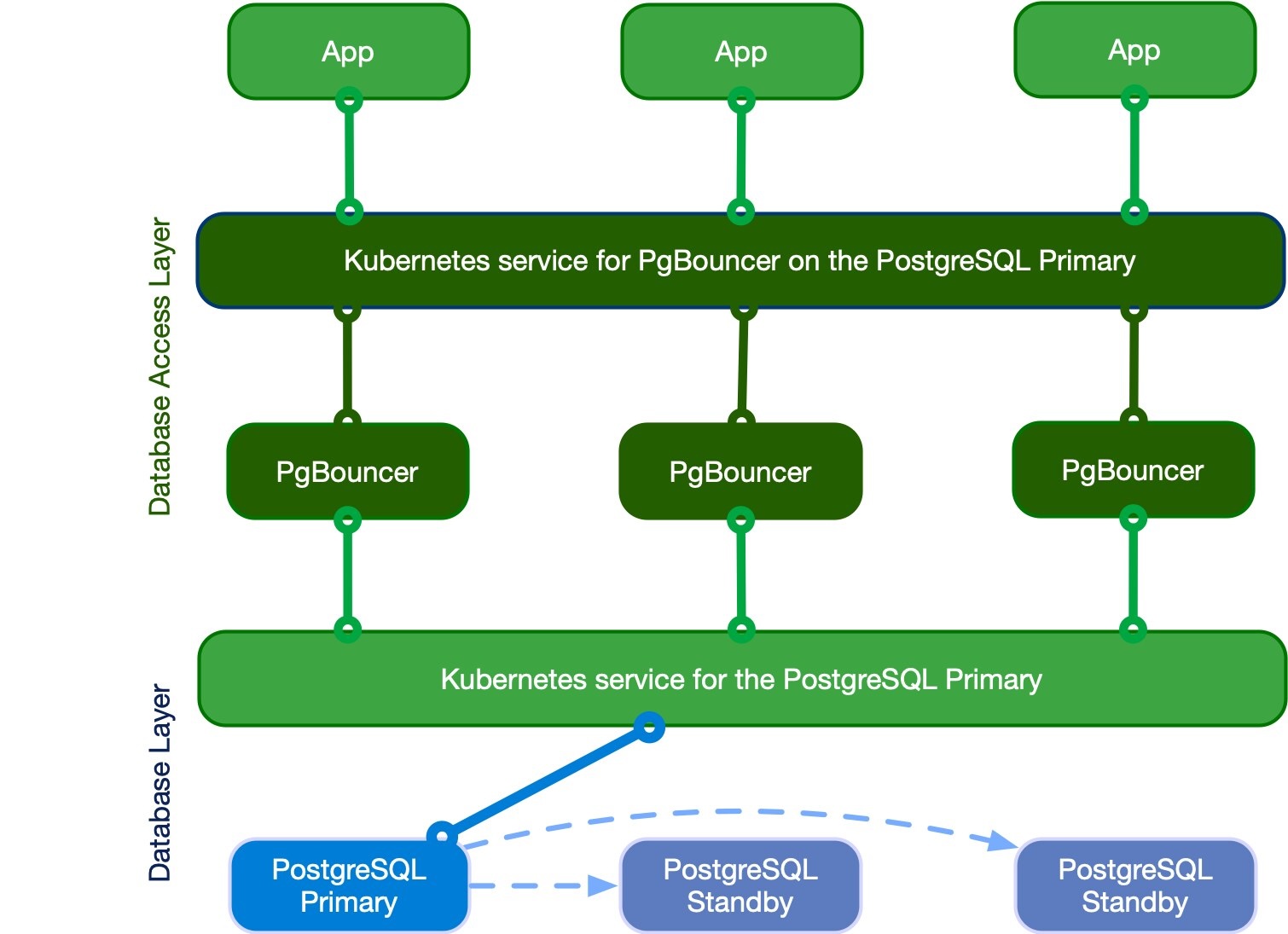
The shape of the thing, courtesy of the CloudNativePG docs. Mentally delete the word “Kubernetes” if you are not running Kubernetes; the topology is identical whether the boxes are pods, EC2 instances, or a Hetzner box you named after a cat. (CloudNativePG, Apache License 2.0)
Postgres allocates a full backend process per connection. A few hundred of them is not concurrency, it is a scheduler thrashing, and the memory is real. Applications open far more connections than the database should ever see, which is why a pooler is not optional infrastructure at any meaningful scale.
pgBouncer has been the answer for well over a decade and has been remarkably, boringly reliable - a single small C process that does one thing and does not fall over. Its one long-standing wart was that transaction mode could not carry protocol-level prepared statements, which meant Rails users had to run with prepared_statements: false and give up the plan cache. Recent pgBouncer versions support prepared statements in transaction mode (via max_prepared_statements), so that objection has largely expired - check your deployed version before assuming either way.
It now has a growing field of competitors - pgcat, Supavisor, Odyssey, and the managed poolers baked into RDS and Cloud SQL - most offering multi-threading, better observability, or read/write splitting that pgBouncer deliberately never attempted. Evaluate them on operational maturity rather than feature lists; the reason pgBouncer endures is that it has already failed in every way it is going to.
Pooling modes
| Mode | Connection released to pool | Ratio you get | What breaks |
|---|---|---|---|
| Session | On client disconnect | ~1:1. Basically useless as pooling. | Nothing. Also saves you nothing. |
| Transaction | On COMMIT/ROLLBACK | 10:1 to 100:1. This is the one you want. | Advisory locks, LISTEN/NOTIFY, SET, temp tables, cursors outside a txn |
| Statement | After each statement | Highest | Multi-statement transactions. Don’t. |
Transaction mode is the product. The breakage column is the price, and it is mostly avoidable: use transaction-scoped advisory locks, move LISTEN/NOTIFY to a dedicated unpooled connection, and set role-level defaults with ALTER ROLE ... SET instead of per-session SET.
Sizing math
The number that matters isn’t max_connections, it’s:
pool_size ≈ (core_count × 2) + effective_spindle_countFor an 8-core box on NVMe that’s roughly 16-20 server-side connections. Everything above that is queueing, not concurrency. People routinely set default_pool_size = 100 and then wonder why p99 got worse - you have just moved the queue from the pooler into Postgres, where it is more expensive and considerably less observable. A hundred backends on an eight-core box is not a connection pool, it is a waiting room with an elephant working the front desk.
Client side you can accept thousands. That asymmetry is the entire product.
Replicas and Replication Lag

Read replicas are the cheapest way to take load off the primary, and they introduce exactly one new class of bug: you write to the primary and immediately read from a replica that has not caught up yet. The row is not missing. It is just not there yet, on that machine, for another few milliseconds. Users hit it constantly, because “create a thing and then look at the thing” is the most common flow in any application.
Lag is normally sub-millisecond and occasionally seconds, and it is never zero. Do not try to eliminate it - handle it. Somebody on your team will propose handling it with a sleep 0.5. Be kind about it, but be firm.
Rails ships ActiveRecord::Middleware::DatabaseSelector, which sends reads to the primary for a fixed window (2 seconds by default) after any write in that session. It is a decent blunt default and it is not enough: the window is a guess, and it is per-session, so it does nothing for a background job reading a record another process just wrote.
The pattern that actually works is an explicit block that reads from the replica and falls back to the primary when the record isn’t there yet:
module EventuallyConsistent
  # Run the block against a read replica. If the replica has not caught up -
  # the record is missing, or the result is empty - run it again against the
  # primary, where it is guaranteed to be visible.
  #
  #   eventually_consistent do
  #     User.find_by!(first_name: "Alan")   # must RAISE or return a value
  #   end
  #
  # @param retry_if_blank [Boolean] also retry on an empty result, not just
  #   on RecordNotFound. Relations and `find_by` return nil/[] rather than
  #   raising, and those are the same "not replicated yet" condition.
  def eventually_consistent(retry_if_blank: true)
    result = ActiveRecord::Base.connected_to(role: :reading) { yield }
    return result unless retry_if_blank && blank_result?(result)

    ActiveRecord::Base.connected_to(role: :writing) { yield }
  rescue ActiveRecord::RecordNotFound
    ActiveRecord::Base.connected_to(role: :writing) { yield }
  end

  private

  def blank_result?(result)
    result.respond_to?(:empty?) ? result.empty? : result.nil?
  end
end
CAUTION
ActiveRecord relations are lazy, and that will defeat this block silently.
eventually_consistent { User.where(first_name: "Alan") } returns an unloaded relation; the query then executes later, outside the block, against whichever connection happens to be current. Nothing runs on the replica and nothing is retried. Force evaluation inside the block - .first, .to_a, .load, .find_by!, .count - or the whole thing is decoration.
Two more rules that keep this honest:
- Reads that must be authoritative do not go to a replica at all. A balance you are about to debit, a uniqueness check, anything feeding a write decision - read it from the primary, under
FOR UPDATEif it matters. Retry-on-miss is for display paths, not for correctness paths. - Measure the lag, do not assume it.
pg_last_xact_replay_timestamp()on the replica andpg_stat_replicationon the primary tell you what it actually is. Alert on it. A replica hours behind because a replication slot filled the disk is a different incident from the one you think you are debugging.
Observability
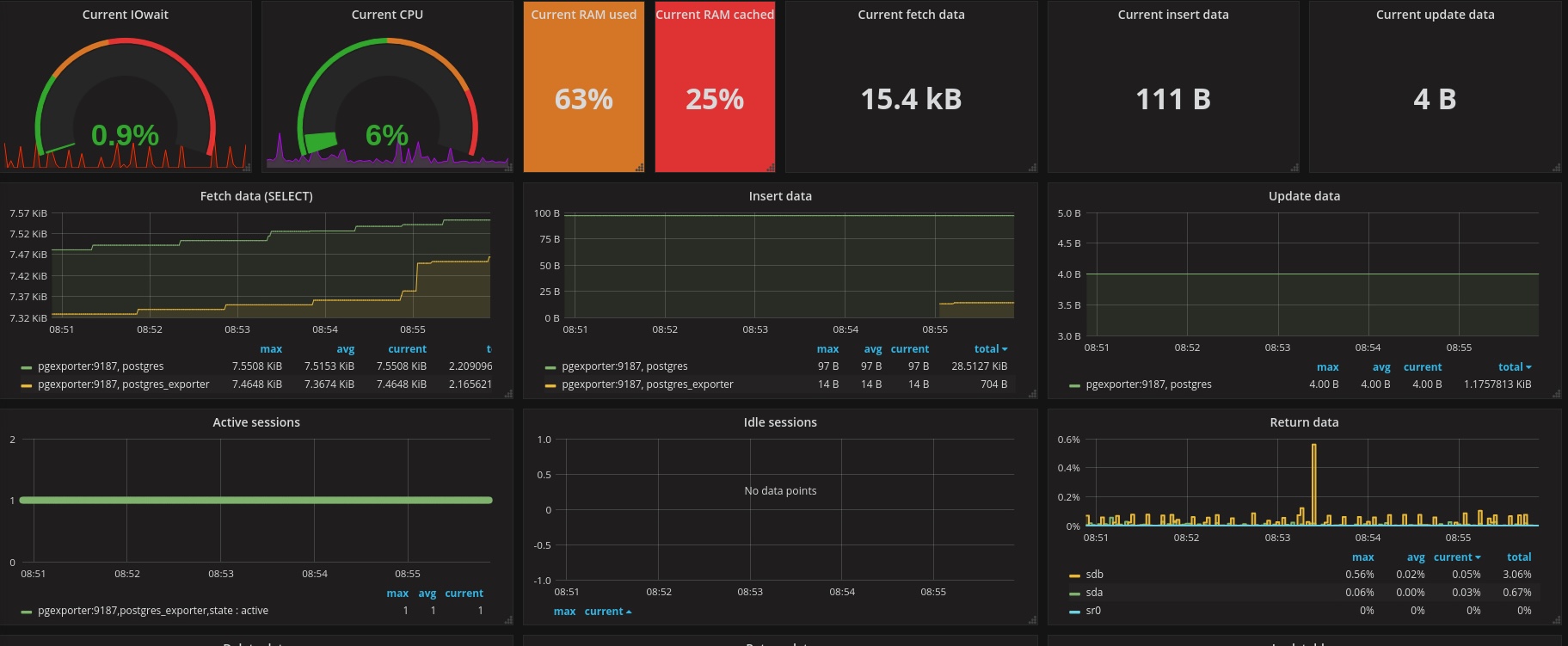
You cannot tune what you cannot see, and the single highest-value thing you can do is make the database readable - safely - by the people and tools trying to understand it.
Of course I’d love for you to use Datadog, NewRelic, HoneyComb, and so on and so forth. But, if you know where to look, or if you played with pganalyze before, then you know how deep performance tuning of PG queries can go. Most “the database is slow” tickets are one pg_stat_statements query away from becoming “the ORM is slow” tickets, which is a completely different ticket with exactly the same assignee.
A read-only role, and let the agents use it
Create a genuinely read-only production role. Not “a role we agreed not to write with” - one that cannot write:
CREATE ROLE app_readonly LOGIN PASSWORD '…';
GRANT CONNECT ON DATABASE app_production TO app_readonly;
GRANT USAGE ON SCHEMA public TO app_readonly;
GRANT SELECT ON ALL TABLES IN SCHEMA public TO app_readonly;
ALTER DEFAULT PRIVILEGES IN SCHEMA public GRANT SELECT ON TABLES TO app_readonly;
ALTER ROLE app_readonly SET statement_timeout = '5min';
ALTER ROLE app_readonly SET default_transaction_read_only = on;
Point it at a replica if you have one, so an exploratory query cannot compete with production traffic.
Then give those credentials - and only those - to a trusted PostgreSQL MCP server. An agent that can read pg_stat_statements, EXPLAIN a plan and inspect the schema is dramatically more useful at diagnosing a slow endpoint than one being fed pasted query text. And a read-only role plus a statement timeout plus default_transaction_read_only means the worst outcome is a wasted five minutes rather than a destroyed table. Vet the MCP server itself the way you would vet anything holding production credentials.
What to read once you are in
pg_stat_statements first, always. It is an extension, it costs nearly nothing, and it answers the only question that matters at the start: what is actually consuming the time? Sort by total_exec_time, not mean_exec_time - the query that takes 3ms and runs two million times is your problem, and it never appears in a slow query log.
PostgreSQL 18 ships roughly forty-six pg_stat* views, and the useful ones beyond the obvious are:
pg_stat_activity- what is running right now, and cruciallywait_event_type/wait_event, which tell you whether you are CPU-bound, lock-bound or IO-bound instead of guessing.pg_stat_io- reads, writes, extends and evictions broken out by backend type and context. This is how you learn that your “slow queries” are actually checkpoint storms.pg_stat_user_tables-n_dead_tup,n_tup_hot_upd, andlast_autovacuum. The HOT ratio here is what the Logical Deletes section is really about, and a table where autovacuum has not run in weeks is a bloat incident waiting to be discovered.pg_stat_user_indexes-idx_scan = 0over a meaningful window is your kill list, as noted in the Indexes section.pg_stat_progress_create_indexandpg_stat_progress_vacuum- how far along thatCREATE INDEX CONCURRENTLYactually is, rather than staring at a hung terminal.pg_stat_replication- lag, per replica, in bytes and in time.
Add auto_explain with a threshold (auto_explain.log_min_duration = '500ms', log_analyze = on) so the plan for a slow query is in the log at the moment it was slow, rather than the plan you get re-running it later against a warm cache and different statistics. And when you do explain by hand, it is EXPLAIN (ANALYZE, BUFFERS) - without BUFFERS you cannot distinguish “read from memory” from “read from disk”, which is usually the entire question. On PostgreSQL 18 you can finally drop the second word: buffers are included automatically whenever ANALYZE is used. Keep typing it anyway if you still touch anything on 17 or older, which you do.
Vector Search
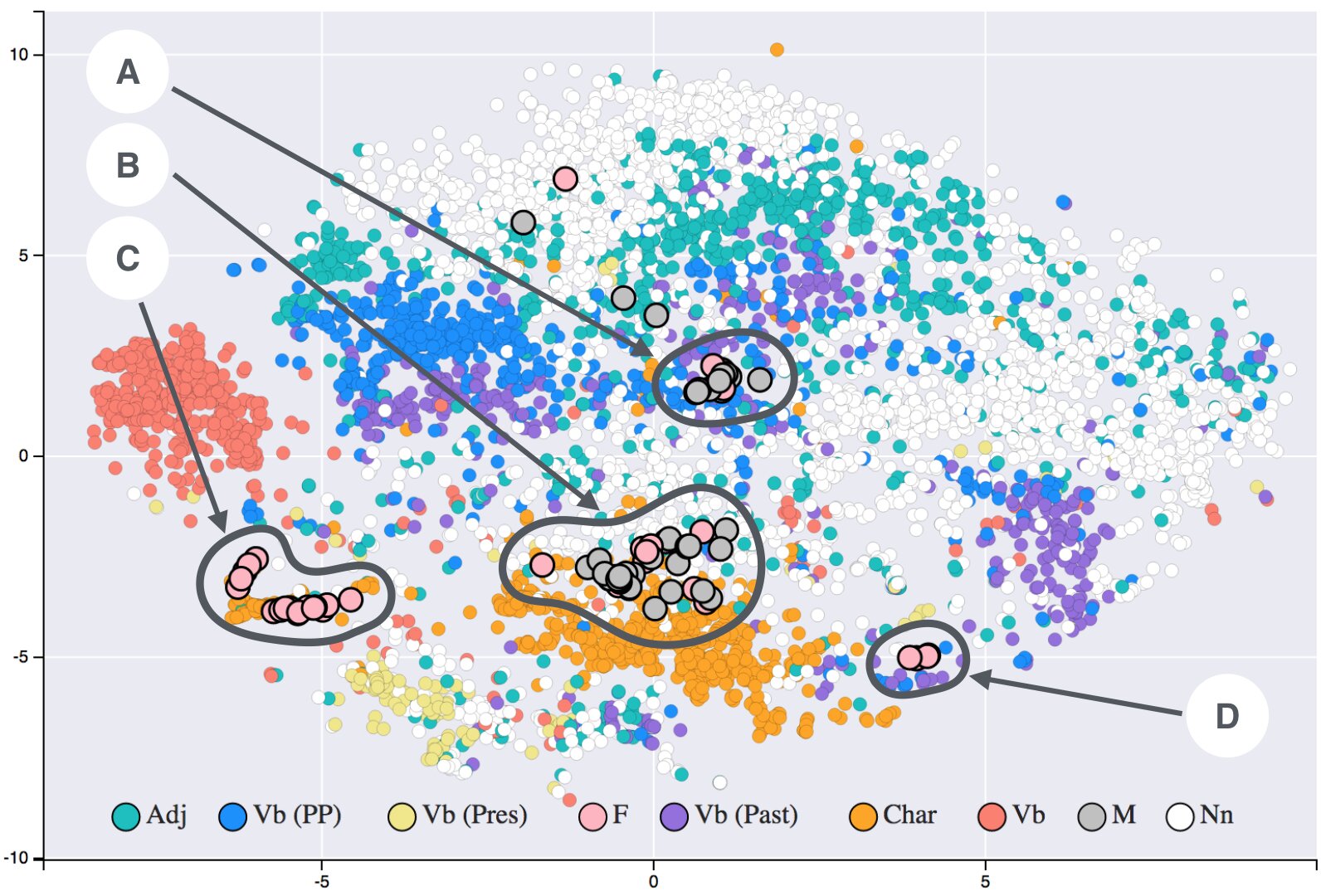
An embedding space, visualised. This is what your vector(1536) column looks like if you squint hard enough and reduce it by three orders of magnitude. (Siobhán Grayson, CC BY-SA 4.0, via Wikimedia Commons)
pgvector is the reason you do not need a separate vector database for most workloads: keeping embeddings in the same transaction as the row they describe removes an entire class of consistency bug, and the join back to your relational data is free.
Store the dimension in the type - vector(1536) - because a mismatched dimension should be a constraint violation at insert, not a confusing distance result at query time. Above 2000 dimensions a vector cannot be indexed at all; use halfvec (16-bit floats, half the size, indexable to 4000 dimensions) which costs almost nothing in recall for typical embeddings.
Match the operator class to your distance function or the index is silently ignored. vector_cosine_ops with <=>, vector_l2_ops with <->, vector_ip_ops with <#>. This is the single most common pgvector mistake: the index exists, the query is a sequential scan, and nothing warns you. Check with EXPLAIN.
HNSW over IVFFlat for essentially every new build. HNSW gives better recall at a given speed, does not need to be rebuilt as data changes, and - decisively - can be built on an empty table, whereas IVFFlat must be built after the data is loaded because its centroids are derived from it. IVFFlat’s remaining advantage is faster build time and smaller index size, which matters at very large scale.
CREATE EXTENSION IF NOT EXISTS vector;

ALTER TABLE documents ADD COLUMN embedding vector(1536);

CREATE INDEX CONCURRENTLY ON documents
  USING hnsw (embedding vector_cosine_ops)
  WITH (m = 16, ef_construction = 64);
Tuning, briefly: m and ef_construction are build-time and trade index size and build time for recall; hnsw.ef_search (default 40) is query-time and trades latency for recall - raise it until recall is acceptable, then stop. Build indexes with a large maintenance_work_mem, because an HNSW build that does not fit in memory takes hours instead of minutes.
Two things people discover late. Filtered vector search is the hard part: WHERE tenant_id = ? ORDER BY embedding <=> ? may over-filter after the index scan and return fewer rows than LIMIT asked for. Partial HNSW indexes per high-cardinality filter, or raising ef_search, are the usual answers. And embeddings are large - 1536 dimensions at 4 bytes is 6KB per row, which will be TOASTed out of line and quietly dominate your table size. halfvec halves it.
Bonus Track: The Part I Didn’t Put in the Skills File
Everything above is what I hand to the machines. What follows is what I keep for the humans, because the machines already know it and you might not. This is the section where I stop being helpful and start being the guy at the bar who has watched a 27TB table refuse writes for three days.

An odometer at 089999, one click away from a number it has never seen before. Your XID counter has exactly this energy, except it is at 2.1 billion and the consequence is not a nostalgic photograph. (Tony Webster, CC BY 2.0, via Wikimedia Commons)
Speaking of Auto-Vacuum, you probably know that it’s kind of important, right? So why is this important? (Great interview question if you want to break your candidate).
TX Wraparound And a Very Bad Long Day (Week?) @ The Office
Well, very very briefly, each transaction in PostgreSQL is tagged with a 32-bit integer, and unlike nearly every other integer this database will hand you, that one is unsigned. So there is no comfortable “2 billion in each direction” to fall back on: the space is 2³² ≈ 4.295B, full stop. Only half of it (2³¹ ≈ 2.147B) can “live in the past” at any given moment, which is where the real ~2.1B horizon comes from.
And one correction to the way this usually gets retold, including by me: the XID counter is cluster-wide, not per table. There is exactly one of them per instance. What lives per table is pg_class.relfrozenxid - the oldest XID that table still has an opinion about - and therefore what is per table is the age. That distinction is the entire reason this shows up on your largest, busiest tables first (the ones that are 27Tb and counting) rather than everywhere at once.
So, in the happy scenario, your default auto-vacuum is running with a decent parallelization (max_parallel_workers, max_parallel_maintenance_workers, etc define how many can run concurrently). What this does is find rows old enough that nobody will ever again need to compare their XID against anything, and freeze them - which since 9.4 means setting a hint bit that says “this row is visible to absolutely everyone, stop asking” rather than literally overwriting xmin with a magic value (pretend the bit is a ”👍🏼”). A frozen row stops holding the horizon back, so that table’s relfrozenxid can advance, and the whole ~2.1B window slides forward with it.
Note carefully what is not happening, because this is where the folk explanation goes wrong: no individual XID number is handed back to a free list for reuse. There is no free list. The counter marches forward forever and eventually laps the track; freezing just guarantees nothing is still standing on the track when it does. You can think of this mechanism as if “PostgreSQL creators had thought that in some very extreme cases you might want to open, and then either commit or rollback around 2.1B transactions simultaneously, so let this XID be a 32-bit integer. Let’s just hope it’s enough for anybody.”
So what might stop that horizon from advancing? Typically something pretty stupid - but almost certainly not the thing you are about to say. Here is the correction I have had to make to my own mental model, and to several other people’s over beers:
Turning autovacuum off does not cause this. PostgreSQL launches an anti-wraparound autovacuum on any table past autovacuum_freeze_max_age (200 million by default) whether you asked for autovacuum or not. The manual says so in a parenthetical so casual it borders on rude: “(This will happen even if autovacuum is disabled.)” You cannot switch it off in postgresql.conf, you cannot switch it off per table, and the elephant does not care about your RDS bill.
What actually pins the horizon is something holding a snapshot open so the freeze cannot proceed:
- a reporting query that has been running since Tuesday;
- an
idle in transactionsession somebody left open inpsqlbefore going to lunch in a different timezone; - an orphaned replication slot for a replica that was decommissioned in March and never dropped;
- a prepared transaction from a two-phase commit that nobody ever committed or rolled back.
Autovacuum dutifully wakes up, discovers it cannot freeze anything newer than that snapshot, achieves nothing, and goes back to sleep. Repeat for nine months.
Then the escalation ladder, and it is worth learning the real rungs, because they get quoted wrong constantly (I have quoted them wrong):
- At
autovacuum_freeze_max_age- 200 million by default - an anti-wraparound autovacuum is forced on that table. - At 40 million XIDs remaining, the server starts shouting into the log:
WARNING: database "mydb" must be vacuumed within 39985967 transactions. - At 3 million remaining, it stops:
ERROR: database is not accepting commands that assign new transaction IDs to avoid wraparound data loss.
And here is the part almost everybody gets wrong, me very much included until embarrassingly recently: the database does not restart itself into single-user mode. It refuses transactions that would assign a new XID. Reads keep working the whole time. And the documentation now goes out of its way to talk you out of the folklore remedy: “contrary to what was sometimes recommended in earlier releases, it is not necessary or desirable to stop the postmaster or enter single user-mode in order to restore normal operation.” You connect like a normal person, find whatever is holding the snapshot, kill it, and VACUUM.
Which is a considerably better story than the legend, with one caveat that ruins it: if the table is 27Tb and you were skimping on IOPS, that VACUUM still takes days, and your writes are down for every one of them. There is no graceful degradation here. There is a very long vacuum, pg_stat_progress_vacuum advancing one block at a time like a hostage video, and a Slack channel filling up with the word “ETA?”.
Long story short - respect autovacuum. Don’t fuck with it. And if you fuck with it, do it in the opposite direction, by increasing parallel maintenance workers. Set up alerts and alarms and lower the artificial limit so that god forbid you get close to it, the real physical limit is still far away.
The single query worth putting on a dashboard, incidentally, is not about autovacuum at all - it is about who is standing in its way:
-- Oldest XID age per table. Alert well before autovacuum_freeze_max_age (200M).
SELECT c.oid::regclass AS table_name,
       greatest(age(c.relfrozenxid), age(t.relfrozenxid)) AS xid_age
  FROM pg_class c
  LEFT JOIN pg_class t ON c.reltoastrelid = t.oid
 WHERE c.relkind IN ('r', 'm')
 ORDER BY xid_age DESC
 LIMIT 20;
Pair it with a look at pg_stat_activity for anything idle in transaction, and pg_replication_slots for any slot whose active is false. Those three queries are the entire early-warning system, and they cost you nothing.
Analyze
One often forgotten feature of PostgreSQL is the analyze command, which collects statistics on all tables by default, or a given table if you pass it as an argument. It sort of does a full-table scan (seq-scan) of the table and randomly samples the data to identify its distribution. Why? So that the query optimizer can use this to figure out whether or not to apply your dumb index on the boolean column is_active where 90% of records are active, and only 10% are not. Given this distribution, a query that has and is_active is TRUE in the where clause will execute as a sequential scan on the entire table, while the FALSE one just might use your index. In general, B-Tree indexes on boolean columns… not a very good idea. Two distinct values, a billion rows, and a B-tree gamely keeping them in order on your behalf. It is the database equivalent of alphabetising a light switch.
Why do you need to care? Well, sometimes, you see, when you or your coworkers have prematurely added a new index to the table with each new column added, and you get something like 12 indexes, in groups of 4, where each group has the same leading column, but different composite columns. Sounds familiar? In the apps I’ve seen, this is, unfortunately, the default amateur behavior, and it hurts your database more than it helps.
If you run the following query, you’ll get to see all of your indexes that HAVE NEVER been used on this instance since the stats counter started:
❯  select schemaname || '.' || relname || '.' || indexrelname as name
   from pg_stat_user_indexes where  idx_tup_read + idx_tup_fetch = 0 order by name;
I dare you. If the list that comes back is more than 500 rows… somebody should get fired. (It is you. In every org where I have actually run that query it turned out to be, quietly and collectively, everyone, which is precisely why it was never anyone.)
So What’s the Actual Takeaway?
Three things, and then I’ll let you go index something.
One: write your own context, or inherit somebody else’s blind spots. The file above is not impressive because it is well written. It is impressive - to me, at least, on a good day - because every single paragraph in it is a scar. The lock_timeout paragraph is an outage. The amount_cents paragraph is an audit. The bit about find_sti_class is a multi-day data migration I would like back, please. You cannot download that from a repo with twenty thousand stars, because it isn’t knowledge, it’s judgment, and judgment is downstream of having been personally inconvenienced.
Two: load it on demand. The single most common mistake I see people make with agent context is stuffing everything into one giant always-on CLAUDE.md and then wondering why the model is distracted, expensive, and vaguely mediocre at everything. Context is a budget, not a shelf. Mine is a directory of files, each loaded only when the task actually calls for it. The PostgreSQL file only shows up when there’s a schema or a migration in play. The rest of the time it doesn’t exist, which is the correct amount of tokens to spend on advice about pgvector while writing a CSS fix.
Three: the bottleneck moved, and you should move with it. I am not 500x more productive because the machine writes 500x the code. I’m 500x more productive on the days when the machine writes code that doesn’t need to be thrown away, and that number collapses to roughly 1x on the days I skipped writing the spec. The lever is not the model. The lever has never been the model. The lever is how precisely you can describe what “correct” means before anybody starts typing.
Now go run that unused-index query on production. I dare you.
Comments