Agentic Software Factory, In Action

There is a particular flavor of sadness that comes from sitting down at your laptop instead of your desktop and discovering that half your skills are missing, your slash commands do not exist, and the agent you just asked to do a thing has never heard of the thing.
I had that problem for months. My ~/.claude folder was a museum: skills installed by hand in February from a repo I could no longer name, plugins that somebody on Twitter recommended, a CLAUDE.md that had drifted apart on three machines like continents. Every new computer was an archaeology project.
So I did what any reasonable person does after the third archaeology project. I wrote three repos.
The problem is not the agents, it’s the sameness
Claude Code is great. Codex is fine. Cursor does things. That is not where the pain is. The pain is that a coding agent is only as good as the context it loads, and the context lives in a pile of dotfiles that no package manager owns.
IMPORTANT
There are no standard package managers yet for plugins, skills, commands, scripts, and so on. Everyone is winging it. So this is my version of winging it, although it is perhaps quite rigorous and consistent in it’s design and implementation.
Nobody publishes my-skills-as-of-tuesday to a registry. You clone a repo, you copy a folder, you forget where it came from, and six weeks later the skill is stale and there is no way to tell which upstream it drifted from. Multiply by two laptops and a desktop.
What I wanted was boring: one file that declares what my agentic environment is, and one command that makes any machine look like that.
Repo I: agentilda-ai-setup
IMPORTANT
This repo, is, perhaps, the most important one of the three. This is because if you run it’s installer, it will also install the other two gems I talk about below. Together with the consistent set of skills, plugins, coding agents, and the global AGENTS.md and CLAUDE.md. To have it be your way, just fork the repo, make your own changes, and run it on any new computer you plan to do AI-assisted development. It’s that simple.
agentilda-ai-setup is the boring one, which means it’s the one that actually solves the problem.
It has a crucial file: configuration.yml. The file lists which coding agents you want installed (with the vendor’s own install line, because I am not in the business of reimplementing npm i -g), which extra executables should be on PATH, and then any number of GitHub repos to pull skills and plugins from.
  - name: pstack
    type: plugin
    repo: git@github.com:cursor/plugins.git
    path: pstack
    include_skills: /\A(architect|unslop|why)\z/
    exclude_skills: /\A(architect-slop)\z/
That last line is the part I use constantly. Most skill repos ship forty skills and I want three. Regular expression, matched against the name the skill installs as, done. There is exclude_skills too, and the same pair for plugins, and an agents: key so a Claude-only source never gets installed for an agent that cannot read it.
As you can see, I added the exclude_skills above for demonstration purposes, but of course in this case it is completely unnecessary.
NOTE
If you haven’t checked out the Cursor’s /unslop skill, you really should. It turns the wall of text that Claude likes to overwhelm you with into a much more structured bullet-point format that’s way easier to read.
Then you simply run:
bin/installYou run the installer. This installs everything into ~/.agents,
does not overwrite anything unless you pass --force, and auto-symlinks
it into ~/.claude so all the skills are available to all agents, Claude included.
Plugins are a bit of a more proprietary story, but if you look how the TypeSafe Jev
plugin is installed, once for claude, once for the rest of the agents, you can see
the flexibility this offers.
Three steps happen. scripts/install-sources builds skills/ and plugins/ in the checkout from the config. bin/install copies that into ~/.agents with every symlink resolved, so ~/.agents holds real files. bin/setup links ~/.agents into ~/.claude.
Nothing under skills/ or plugins/ is committed. They are fully regenerable from the config, which is the whole idea. The moment a skill exists in git with no record of where it came from, you are back in the museum.
My favorite property: tightening a filter takes skills away. Next run unlinks whatever it installed last time and no longer wants. The tree converges on what the file says instead of accumulating like a Downloads folder.
My Own skills
The repo has a folder src/skills which contains skills I wrote myself. At some point I’ll move them to a standalone repo that’s installed the same way every other repo is. But for the time being, my own creations live with the repo and get installed together with the rest of the stuff defined in the configuration.yml
Deliberate trade: editing src/skills/foo does not reach ~/.claude until you run install again. Installed tree that keeps, rather than a live symlink into a checkout you might rename on a Tuesday.
Repo II: agentilda, or the part that does the work
They say “picture is worth a thousand words” so here it is, in action:

NOTE
The screenshot above is tilda run with agents working on two plans at once. Left plan has backend and frontend both building. Right plan is still at research. Nobody is merging anything, which is the point.
agentilda is a Ruby gem with one command, installed as both agentilda and tilda. It has a ratatui-based dashboard, which is a Rust extension, which means installing it needs cargo and clang. Sorry. It looks good though.
What it actually does is manage a .plans folder and drive a team of specialist agents over it. You write a short brief. Seven agents research it, spec it, plan it, build it, review it. You merge. They never merge.
The folder name is the state, which sounds like a gimmick until you have used it for a week:
.plans/000.00-✅ → dev-foundation
       001.00-🟡 → tenancy-households
       002.00-⚪️ → tax-rule-dsl
Number is permanent, branches and PR titles join on it. Emoji is the state. And a folder may only claim a state its files can prove: no plan.md, no ⭐️. Agents lie about having finished things. Disk does not.
The cast, roughly:
| Agent | Does |
|---|---|
leah-researcher | researches the brief in parallel, appends a Research chapter |
yoda-writer | writes the real spec, or blocked.md when a human has to decide |
palpatine-planner | splits the spec into independently buildable work units |
luke-backend | data, domain, API, tests |
rey-frontend | the interface against Luke’s API, and proof the halves fit |
hansolo-reviewer | reviews the diff against the plan, rejects at most twice |
lando-broker | folds your answers to blocked questions back into spec and plan |
Yes, the names are what you think they are. No, I will not be taking questions.
Luke and Rey work at the same time, in the same worktree, toward one PR, and talk to each other through a mailbox.md. Which is exactly the situation that requires repo three, so hold that thought.
Two safety rails matter more than the rest. Agents cannot publish. They write source, tests and their plan documents, and that is it. The tool withholds git commands from them and then checks afterwards that HEAD did not move, because trusting an agent’s own report about whether it committed is how you end up with a very confident pile of nothing. The harness commits, pushes and opens the PR. And every command that writes is a dry run until you add --commit.
tilda create tax rule dsl      # writes the brief skeleton, opens it
tilda run                      # who would take what, touching nothing
tilda run --commit -j 4        # four agents at a time, worktree each
tilda list-plans               # state and PRs for everything
When an agent crashes, times out, or you press q, it writes a RESUME: note into the plan’s mailbox and signs itself Interrupted. Every agent reads its mail before starting. A later run picks up instead of redoing fifteen minutes of research you already paid for.
What it looks like with a dozen plans at once
Talking about it is cheap, so I recorded one. The repo started with twelve plan folders under .plans, and each held only a spec.md. No plan.md, no code, no pull requests. A few specs already had Leah’s research chapter appended from an earlier run, and two were already parked waiting on me. Then I ran tilda run --commit and went to make tea.
It opens with tilda list-plans, so you can see the starting line. What follows is every plan getting its own dedicated agent in its own worktree. Leah researches and signs off, and the harness hands the folder to Yoda. Yoda writes the real spec and passes to Palpatine, who plans and passes to Luke and Rey, and so on down the line. Some of them spin up their own sub-agents for parallel research or to split a build, which is exactly where alock earns its keep (more on that below). Each row in the dashboard is one agent on one plan, with its last few status lines underneath, newest first.
It went on for about thirty five minutes of wall clock and 141 million tokens, at which point every remaining agent died with You've hit your session limit and the factory went quiet in the middle of a shift. Very realistic, actually. Real factories also stop when nobody pays the electricity bill. The recording ends with the harness listing which agents got cut off, and a box saying six plans need a human decision, with the exact tilda unblock command to run once I answer them.
But the project moved forward a lot. Here’s .plans afterwards:

Six plans are 🟡 Building: they made it through research, spec and planning, and Luke and Rey are writing code. The other six are ⭕️ Technical Block, which means an agent hit a question it had no business answering on its own and wrote it into blocked.md instead of guessing. Honestly, that is my favorite part of the screenshot. An agent that stops and asks is worth ten that confidently invent your architecture.
To unstick those, I write my answers into each blocked.md and run tilda unblock 008 --commit. Lando folds the answers back into spec and plan, and the folder returns to ⭐️ Planned for the next run.
agentilda-state.json next to the folders is the run’s bookkeeping: process ids, token counts, who was doing what when everything stopped. It’s git-ignored, and it is how the next tilda run picks up where this one died instead of starting over.
What the emoji mean
Every emoji in a folder name is a state, and every arrow is a handover from one agent to the next:
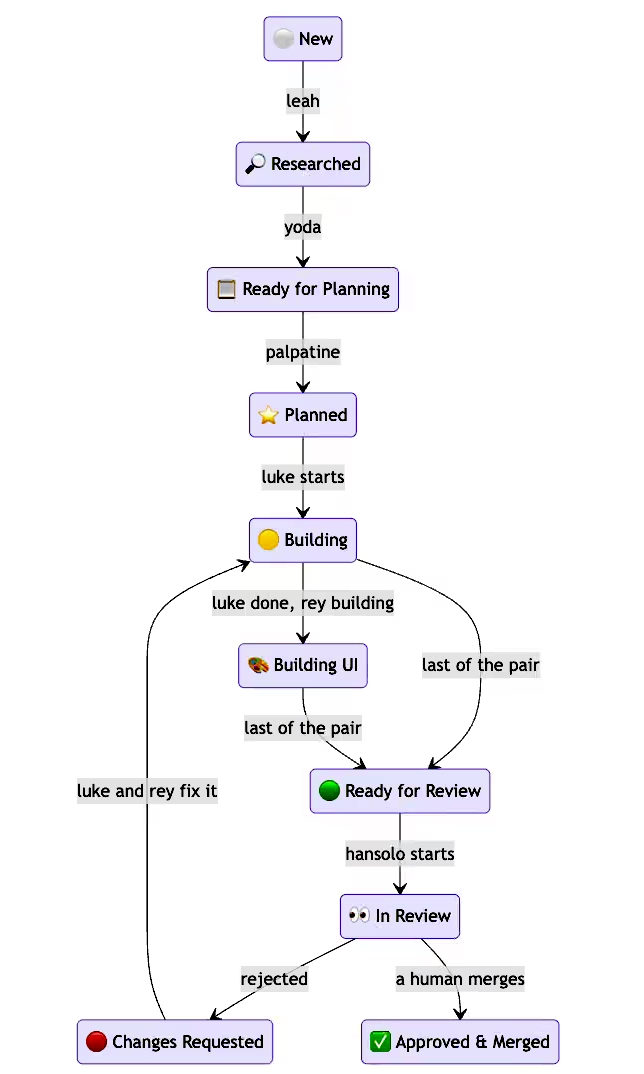
Top to bottom:
- ⚪️ New: you wrote a brief in
spec.md. Leah picks it up. - 🔎 Researched: Leah appended her research chapter. Yoda picks it up.
- 📋 Ready for Planning: Yoda wrote the full spec, with goals, non-goals and scope. Palpatine picks it up.
- ⭐️ Planned: Palpatine split it into work units in
plan.md. Luke starts. - 🟡 Building: Luke is on the backend. When he is done and Rey is still working on the frontend, it becomes 🎨 Building UI. Whichever of the two finishes last moves the plan on.
- 🟢 Ready for Review: a PR exists. Han Solo starts reviewing, and the folder becomes 👀 In Review.
- 🔴 Changes Requested: Han rejected it, so Luke and Rey go back to 🟡 and fix it. He rejects at most twice.
- ✅ Approved & Merged: only a human gets to draw the last arrow. It says so right on the diagram.
The blocked states (⭕️ technical, 🅱️ product) are not on the diagram because they are off the main road: any agent can park a plan there, and only you can get it back out. Same for the endings nobody wants, like 💩 Scrapped by Review and ❌ Discarded.
The important part is that no agent ever renames a folder. It signs the document it owns with Completed, Blocked or Interrupted, and the harness checks that the files the next state requires actually exist before it moves anything. So when you see 🟡 in that screenshot, it’s not an agent’s opinion. It’s a plan.md on disk.
Repo III: agent-lock, the least glamorous, but no less important one
Here is the thing nobody tells you about running several agents in one checkout: git will not save you.
Two agents on one branch and one working tree do not produce a merge conflict. There is nothing to conflict. The second writer just wins, the first one’s work is gone, and no error appears anywhere. You find out later, from a file that is mysteriously shorter than you remember.
agent-lock ships alock, which is advisory locking on globs:
alock acquire "lib/billing/**" "rewriting the invoices"
alock check   "lib/billing/tax.rb"
alock note    "lib/billing/**" "totals done, specs red"
alock release-all
A refusal tells you who, since when, and what they are doing, not merely that you lost:
$ alock acquire lib/billing/tax.rb
REFUSED, do not write here
HELD  lib/billing/**  by luke-backend  since 2026-09-09T21:04:11Z
      intent: rewriting the invoices
The lock is a markdown document with frontmatter and a progress log, not a flag file. Agent that runs into one learns enough to decide whether to wait or go elsewhere. Human that runs into one can open it in an editor.
Locks live in $(git rev-parse --git-common-dir)/agent-locks, which is a quietly excellent choice: git cannot track it, git clean -xdf cannot reach it, every worktree resolves to the same store, and it dies with the checkout instead of accumulating in your home directory forever.
The hard part was never the locking. It was identity. An agent harness runs every command in a brand new shell, so export AGENT_ID=... from the previous call is gone. Worse, Claude Code runs sub-agents inside the parent’s own process and sets nothing that tells them apart, so by default all eight of your sub-agents share one fingerprint, sign every lock as the parent, and block absolutely nobody.
So a sub-agent names itself on every single call:
AGENT_ID=luke-backend alock acquire lib/billing/** "invoices"And the model is a family rather than a single holder. Your parent’s scope does not block you; you claim something narrower inside it, and that is what keeps your siblings out. Your own release-all takes your locks and your children’s, never your parent’s. Asking for exactly your parent’s scope is refused, since that leaves nothing for a sibling to be excluded from.
Crash handling has a detail I like. When a holder is provably dead, a lock with no notes is deleted, because there is nothing to come back to. A lock with notes is orphaned instead: claim void, record kept, and acquire refuses to silently paper over it.
$ alock acquire workflow/**
INTERRUPTED WORK on workflow/**, left by luke-backend
  alock resume workflow/**   # take it back, notes and all
  alock break workflow/**    # throw it away and start over
Backend is Redis if one answers locally, file system otherwise. Choice is recorded once in a marker file and every later process in that tree is bound to it, claimed atomically with O_CREAT|O_EXCL. Because the genuinely dangerous failure is not “no lock”, it is two agents taking locks in two different stores, seeing nothing of each other, and both reporting success.
And critically, the gem ships a skill that teaches agents the rules, so they live where agents read them instead of in a README nobody loads. Advisory locks only work because everybody checks.
The part I actually care about
Any of these three alone is a moderately useful utility. Together they are the thing I wanted: a machine I can hand a config file and get my exact working environment back, a workflow that turns a paragraph into reviewed PRs across any repo, and enough coordination that running eight agents at once is a Tuesday rather than an incident.
The honest caveats. It is my setup, opinionated in ways that are about my taste and not a law of nature. The .plans emoji naming makes shell quoting mandatory, forever. Ratatui needs a Rust toolchain. And the agents still produce PRs that need real review, which is precisely why nothing merges itself.
I wrote a bit before about condensing twenty years of opinions into one markdown file. This is the sequel: making sure that file, and everything around it, is the same on every machine I sit down at.
gem install agentilda agent-lock -N
git clone https://github.com/kigster/agentilda-ai-setup
cd agentilda-ai-setup && cp configuration.example.yml configuration.yml
# read it before you run it, seriously
bin/install --dry-run
And if you were curious about my PostgreSQL skills files, they are available to pick and choose right here:
I should probably mention that these skills cross-reference each other, so you might want to grab them all to get the maximum benefit.
All three are MIT. If you run more than one agent at a time, at minimum steal alock. Ask me how I learned that one.
Comments